React使ってSPAを作るよ(20)の続きです。
今回はちょっと大掛かりですが、コメント送信フォームとリストの表示をしたいと思います。
送信用のAPIはいつもどおり作ってもらいました。
まずはこれを$.ajaxで送信するためのフォームコンポーネントを作ります。
//コメント入力欄
var CommentInput = React.createClass({
  handleCommentSubmit: function(){
    $('#spinner').css('display', 'block');
    var articleID = this.props.articleID;
    var comment = this.refs.comment.value;
    $.ajax({
      url: '/api/comment',
      type: 'POST',
      data: {"article_id": articleID, "user_id": loggedin, "comment": comment},
      timeout:10000,
    }).done(function() {
      articleBool = true;
    }).fail(function(xhr, status, err) {
      console.error('/api/comment', status, err.toString());
    });
    this.refs.comment.value = "";
  },
  render: function() {
    return (
      <form className="comment-input" id={'comment-input' + this.props.articleID}>
        <textarea placeholder="コメント" ref="comment"></textarea>
        <button type="button" className="button01" onClick={this.handleCommentSubmit}>コメントを送信</button>
      </form>
    )
  }
});
React使ってSPAを作るよ(17)でやったのと同じように、articleBoolというフラグを立てて、loadArticleFromServer()が実行されるようにしています。
fetchURL()に判定を追記しておきました。
//記事リストコンポーネント
var ArticleArea = React.createClass({

  //JSONデータ取得
  getInitialState: function() {
    return {data: []};
  },
  fetchURL: function() {
    if(apiURL === 'post'){
      apiURL = './api/article';
      tmpURL = apiURL;
      this.loadArticleFromServer();
    }
    else if(apiURL !== tmpURL){
      tmpURL = apiURL;
      this.loadArticleFromServer();
    }
    else if(articleBool === true){
      this.loadArticleFromServer();
    }
  },
//略
・・・なんかもうちょっときれいにまとめて書けそうな気もしますが、処理の違いがわかりやすいようにこのままにしときます。
再レンダリングしたあとは、忘れずにフラグをfalseに戻しておきます。
  loadArticleFromServer: function() {
    var t = this;
    $.ajax({
      url: apiURL,
      dataType: 'json',
      cache: false,
    }).done(function(data) {
      t.setState({data: data});
      $('#spinner').css('display', 'none');
      $('#menu00').prop('checked', true);
    }).fail(function(xhr, status, err) {
      console.error(apiURL, status, err.toString());
      $('#spinner').css('display', 'none');
    });
//追加
    articleBool = false;
  },
すでに投稿されたコメントは「/api/article」で返ってくる記事リストの中に含まれることになります。
React使ってSPAを作るよ(6)で最初につくったJSONのこの部分ですね。
    "commentData": [
      {
       "author": "その1ユーザー1",
       "authorImage": "https://source.unsplash.com/random",
       "comment": "その1コメント1"
      },
      {
       "author": "その1ユーザー2",
       "authorImage": "https://source.unsplash.com/random",
       "comment": "その1コメント2"
      },
      {
       "author": "その1ユーザー3",
       "authorImage": "https://source.unsplash.com/random",
       "comment": "その1コメント3"
      }
    ]
  },
モックの時にはなかったのですが、投稿したユーザー名と日時くらいは出しておきたいな、と思ったので、ここに投稿日時のdateを追加して、コンポーネントは以下のようにしました。
//Comment.jsx

var React = require('react');

//コメント
var Comment = React.createClass({
  render: function() {
  var authorImage = {
    backgroundImage : "url(" + this.props.authorImage + ")"
  };
    return (
      <li>
        <span data-account={this.props.author} style={authorImage}></span><span><span>{this.props.author}<time>{this.props.date}</time></span>{this.props.comment}</span>
      </li>
    )
  }
});

//コメントリスト
var CommentList = React.createClass({
  render: function() {
    var commentNodes = this.props.data.map(function(comment) {
      return (
        <Comment author={comment.author} authorImage={comment.authorImage} comment={comment.comment} key={comment.id} />
      )
    });
    return (
      <ul className="comment-list">
        {commentNodes}
      </ul>
    )
  }
});

module.exports = CommentList;
さきほどのコメントフォームとあわせてArticleListの中で呼び出しましょう。
ログインしていないユーザーは投稿できないので、loggedinにユーザーIDが入っているときだけフォームを表示します。
//ArticleArea.jsx

//略
        <h3>コメント</h3>
        <CommentList data={this.props.articleComment} />
        {(() => {
          if (loggedin) {
            return <CommentInput articleID={this.props.articleID} />;
          }
        })()}
//略
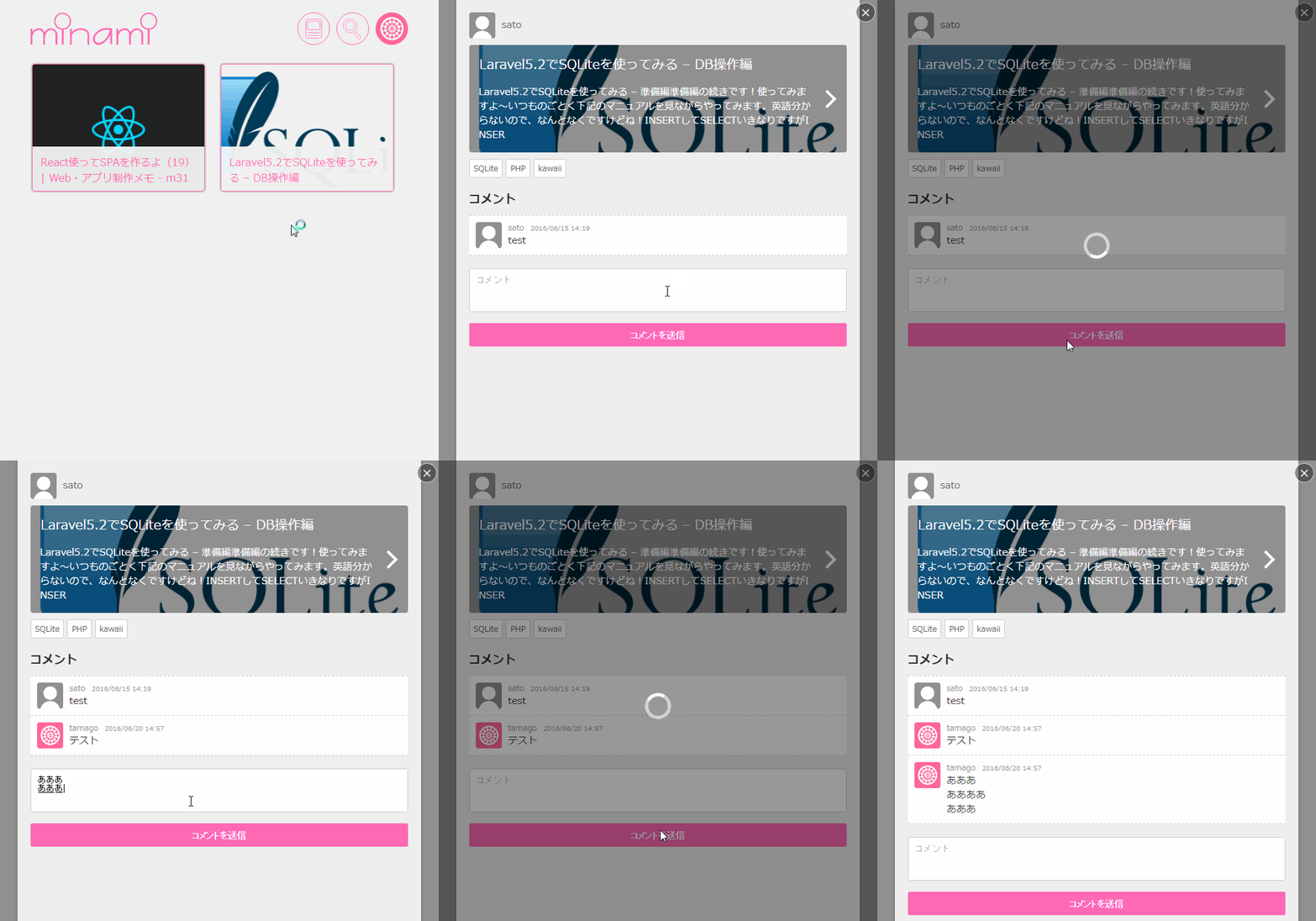
Reactでtextareaの複数行テキストをリストにする
さてこのコメントリストですが、みなさんだいたい困っているようです。
DBに入れるときに変換しても、Reactの実態はJSなので<br />がそのまま表示されてしまいますし、何もしなければ改行されずにテキストノード1個分の謎の空白ができて1行に繋がってしまいます。
だからみんな、mapを使って改行コードごとに要素を区切って表現しているんですね。
しかしこれ、HTML大好きな人間には苦しいですね。
でも大丈夫。
たった1行のCSSが解決してくれます。
white-space: pre-wrap;
半角スペース・タブ・改行をそのまま表示してくれる指定です。
かんたーんヾ(*´∀`*)ノ